Acrobat -- Split Pages in 2 Parts and Combine to a New File


Direct purchase using PayPal ($40 only)!

This script allows you to split each page of a PDF into two parts and recombine those parts into a new PDF. By default the pages are split dead in the center, but this can be customized to match your specific needs.
This script can be useful if you scanned two pages of a book or a magazine as a single page, but would like to have them as separate pages.
The split can be either vertical (like in the case above), but horizontal splits are also possible.

Here's a sample of a regular file that has been split vertically at 50%-50%:


And here's the same file split horizontally:


For more information about this tool you can contact me directly.

Photoshop -- Create Copies Using Different Texts

Let's say you have a Photoshop file with a text layer in it, say a customer's name, and you want to have 100 copies of this file, each having a different customer's name, and maybe a specialized style for this customer: different font, different text color, different size...

Well, this script will allow you to do it! It takes a pre-existing image and a text file containing all the relevant data, and makes multiple copies of this image, using the given data.

The different parameters can be customized to fit your needs, as always.

If you're interested in purchasing this script, contact me directly.

Acrobat -- Automatically Insert Links to Pages

If your document contains the text "see page 4" or "(p. 3)" and you want the reader to be able to click on this text and be linked to the referenced page, this is the script for you...
It will scan the entire document and create proper links to all page references. The format of the reference can be adjusted to your purposes.

If you're interested in purchasing this script, contact me directly.

Acrobat/Reader -- Duplicate Annotations to Multiple Pages


Direct purchase using PayPal ($40 only per license)!

Another Update: Now available, a free demo version of this script. This version will duplicate the first selected annotation to up to 3 pages.

Update: The script is now also compatible with Reader, provided the file has the right to add annotations to it, of course. This right is built-in to Reader XI, so if you're using that version you can pretty much use this script on any file (unless it's secured).

Using this script you can select one (or more) annotations of any kind (stamps, highlights, sticky notes, text boxes, sounds, icons, etc.) and create exact copies of them to one (or more) additional pages of the same PDF. When you just copy and paste an annotation in Acrobat it doesn't paste it at the same position, which can be annoying if you need to make multiple exact copies of the same comment.

Let's see how it actually looks like... Say we created this cloud comment on the first page and want to duplicate it to the rest of the first 10 pages of the document:
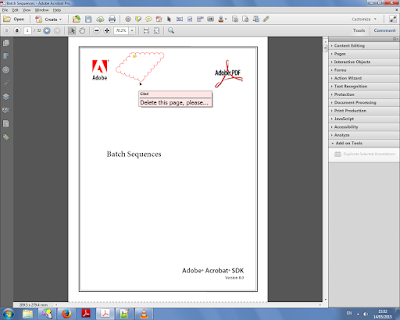
The annotation we want to duplicate (click to enlarge)

We select it with the mouse and then click the "Duplicate Selected Annotations" button under the Tools menu on the right:


We then enter the page range we want to duplicate the annotation to:


And the results can be seen on pages 2 and 3 here:


And finally up to page 10 here:


For more information about this tool you can contact me directly.

Photoshop -- Easy Navigation Between Photos

With this handy little script, which can be attached to a keyboard shortcut and run easily, you can navigate your folder of photos with ease. Jump from one photo to the next one, previous one, or the first or last photos in the same folder in a second. The photo you worked on is automatically saved, and the new photo opened, saving you time and allowing a more efficient editing process.

If you're interested in purchasing this script, contact me directly.

Acrobat -- Create Hyperlinks from a CSV

NEW: Direct purchase using PayPal (via PayLoadz)!
Single file version: Buy Now
Batch version: Buy Now


Similar to my earlier Add Hyperlinks to Text script, only this one can be used with a CSV file, or just a regular text file which contains key-terms and URLs.

This script will scan the entire file for these key terms and make each of them into a link to the appropriate site.

A batch version of this script is also available for processing multiple files with a single go.

If you're interested in purchasing this script, contact me directly.

Acrobat -- Create Links from Partial URLs


Direct purchase using PayPal! ($40 only)

Acrobat can automatically add links to text such as http://www.google.com or www.google.com, but not to "partial" links such as "google.com"... Well, this script can do it.
It will scan an entire document and automatically detect and create links to websites based on the underlying text.

Update: This script now includes a Batch Process (or Action) that allows you to run it on multiple files. Requires Acrobat Pro.

If you have any questions regarding this tool, contact me directly.

Illustrator -- Search and Replace Text


Direct purchase using PayPal ($50 per license)

This script introduces a basic feature that is missing from Illustrator. It allows you to search and replace text items in your current file, or in all open files.

You can use this tool for plain-text searches (replace "cat" with "dog") or even use Regular Expressions for your search (replace all instances of a four-digit number with another number).
The tool will process all the text frames in the file (or files) and will report how many changes it made when done.

For more information about this tool you can contact me directly.

Acrobat -- Auto Increment a Field's Value


Direct purchase using PayPal ($50 per license)!

If you want to make sure your file has a field which automatically increments its value on a certain action (for example when the field is opened), then this is the tool for you!

You can choose one of the following triggers for this action:
  • On Document Open
  • On Page Open
  • On Page Close
  • Before Printing the file
  • After Printing the file
  • After Saving the file

For more information about this script, you can contact me directly.

Acrobat -- Mark up entire line with text


Direct purchase using PayPal ($40 per license)!

Update: The tool can now search for any phrase, not just single words.
Also, copying the text to the highlight is now optional.

This script allows you to enter a key term, which will then be searched for in the document, and if found - the entire line will be marked up and its contents saved in the comment.
The contents can later be exported to a text, CSV, or PDF file for easy access.

This is an excellent tool for anyone who has a lot of data and is looking for a specific term (and its context) within it.

Here's an example. I searched for the term "Systems" here:


If you have any questions regarding this tool, you can contact me directly.

Acrobat -- Combine Files based on their Name or Content

Using a batch sequence this script can scan an entire folder (including all sub-folders) and merge the files from it based on either their name or text (or any other criterion defined by the user) into new files. At the end a detailed report will be created.

Illustrator -- Compare 2 AI Files

This script will compare two Illustrator files and will produce a detailed report of the differences between them. It can also create a visual representation of said differences by hiding all the identical parts and revealing the different ones.

Acrobat -- Add Bookmarks Names To Pages


Direct purchase using PayPal ($30 only)!

This script will add (watermark) the names of all top/lowest-level bookmarks in a PDF onto the page(s) they are pointing to.

When you run the script, you can select whether to watermark just the first page, or all subsequent pages (until the next bookmark), as well as all the other settings for the watermark text, like its exact location, color, font used, etc.

New feature: You can now select whether to use the top-level bookmarks or the lowest-level bookmarks when running the script.

A free demo version of the tool, which will only process the first bookmark in the list, and does not contain the customized options below (it will add the text as a footer to each page), can now be downloaded from here.


The script will then proceed to process the entire file with the settings you selected.


For more information about this tool you can contact me directly.

Acrobat -- Batch Crop Pages

For some reason, Adobe removed the Crop Pages option from the Batch Processing menu of version 9... Well, now you can have it back with this script!