Showing posts with label XI. Show all posts

Reader -- Create Form Fields in Adobe Reader


Direct purchase using PayPal ($40 only per license)!

One of the most frustrating things in Adobe Reader is that you can't add form fields to your files with it. You can fill them in, if they exist, but not create them. You usually need to purchase some expensive application to do that, but not any more!

Using this new tool I've developed one can create form fields even in the free Reader (XI version only!), simply by drawing them using built-in the Square commenting tool and then converting them to real, fillable fields.

It's fast and easy to do. All you need to do is draw the squares where you want the fields to be located, and as their comments enter the desired field name, like so:

The original comments (click to enlarge)
You can even specify some special properties for various field types, such as:
- Default values for Text fields
- Export values for Radio-Buttons and Check-Boxes
- The list-items for Combo-box (Drop-down menus) and List-box fields

After creating the comments you select the ones you want to convert and run the tool from the Extended menu on the right:

Creating text fields I
You select which kind of fields they should be from the list:

Creating text fields II
 And voilà... The new fields are created! As you can see the one on the right has a default text, and the one on the left shows the field name of that field.

Creating text fields III
 They are editable, just like any field created elsewhere.

Creating text fields IV
 We can also create check-boxes:

Creating check-boxes I

Creating check-boxes II
Radio-buttons...
Creating radio-buttons I

Creating radio-buttons II
A combo-box field, with items:

Creating a combo-box I
Creating a combo-box II
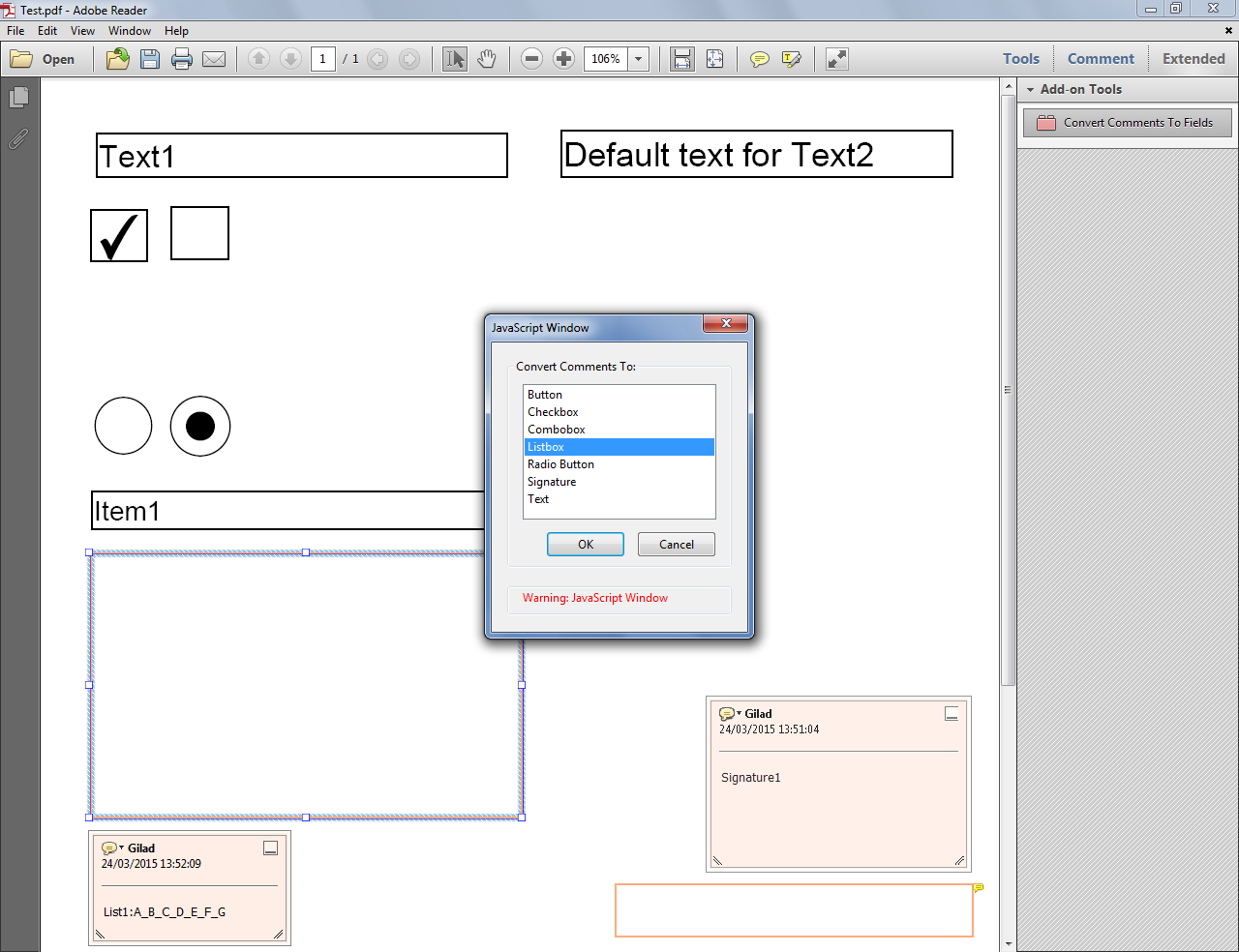
 A list-box, with items as well:

Creating a list-box I

Creating a list-box II
 And even a real Digital Signature field!

Creating a signature field I

Creating a signature field II
The file can now be saved and distributed, just like any other PDF form!

If you have any questions about this tool, you can contact me directly.

Acrobat/Reader - Disable Sign Pane and Signature Bar

Yet Another Update: Adobe just published its own instructions on how to disable the Signature Bar, both for Windows and Mac computers. See: http://helpx.adobe.com/acrobat/kb/disable-echosign-detection.html

Hopefully this is a sign that they'll remove (or at least disable) this feature in future releases... We'll wait and see!

Another Update: For any Mac users willing to disable this feature, check out the discussion between myself and a Mac user in this thread (2nd reply and the comments under it). As stated there, the solution I suggested is not tested by me so I take absolutely no responsibility for trying to implement it.

Update: Adobe revealed that there's a specific registry setting to disable just the Signature bar.
See: http://www.adobe.com/devnet-docs/acrobatetk/tools/ReleaseNotes/11/11.0.03.html#echosign-integration

Many people dislike the newly added "feature" in the latest versions of Acrobat and Reader that shows a green bar at the top of the document when the application thinks that is requires a signature (this seems to be based solely on the content of the document, when it contains the words "sign" or "signature").

Acrobat doing a not-very-good job of detecting when a signature is needed...
(click to enlarge)

Unfortunately, there is no option to disable this feature, which is why I delved into the registry reference and found a workaround. By downloading and executing these FREE .reg files you can completely remove the Sign pane from Acrobat or Reader, taking along with it this new signature detection feature.

The same file after running the .reg fix for Acrobat XI. Notice the Sign button is gone, as well as the green bar at the top.
(click to enlarge)

IMPORTANT: Running these files will change your registry and you do so AT YOUR OWN RISK.

Also, this workaround works only for Windows installation of Acrobat and Reader XI.

The download links are:

Disable Sign Pane (Acrobat XI)

Disable Sign Pane (Reader XI)

Enable Sign Pane (Acrobat XI)

Enable Sign Pane (Reader XI)

As always, I can be contacted directly at try6767@gmail.com, and if you find this tool useful and would like to donate, it's always appreciated!

Regarding Acrobat XI

As you've probably heard already, Adobe has released the newest version of the Acrobat and Reader family applications, called XI.

As always, I do my best to make sure that all of my scripts are compatible with all (recent) versions of Acrobat and Reader, and unless mentioned otherwise, they are.

However, with this new version Adobe has introduced a major change to the way Action files are saved (they are now XML-based, as opposed to the non-standard format they had before). This means that Actions that were created in previous versions of Acrobat can be used in Acrobat Pro XI, but can't be edited in any way. This will probably cause some issues if you purchase any of my tools that includes Action files.

I am working on creating new versions for all of my Actions that are compatible with this new format, and will add them gradually to my scripts, as soon as they're ready.


If you encounter any problem using one of my scripts in Acrobat (or Reader) XI, please let me know (try6767@gmail.com, as always), and I'll do my best to solve the problem for you.