Acrobat/Reader -- Export Form Fields' Names, Properties


Direct purchase using PayPal ($20 only per license)!
 
If you want to keep track of the different form fields in your PDF, this is the tool for you. It will create a text report with all of the fields names, types, and other properties you might be interested in. If you're interested in purchasing this script, contact me directly

Acrobat -- Adjust Size of Multi-line Text Fields before Printing

Acrobat form fields has an option to create a multi-line text fields, which is very handy when you need to input a lot of data, but what about when you want to print the file? This script will automatically scan a PDF file and adjust the size of the text fields so that all text entered into them is visible. It uses a special algorithm developed by me which takes into account the font size, as well as other properties.

If you're interested in purchasing this script, contact me directly.

InDesign -- Extract Pages To New INDD Files


Direct purchase using PayPal ($40 per license)!


There isn't any built-in option in InDesign to extract one or more pages as a new InDesign (INDD) files, but using this script it's now possible!
You can select to extract each single page as a new file, or a range of pages (pages 3-5, for example), or a fixed amount of pages (1-3,4-6,7-9, etc.).

If you have any questions regarding this tool, contact me directly.

Acrobat -- Custom-Made Stamps and Forms

Custom calculations, validations and formatting of all kinds for Acrobat Forms.
I will make sure your forms work exactly the way you want them to.

NEW!
Custom-made stamps to be used on PDF files, including dynamic stamps with the user's name, current date, company's name and any other information you would like to add.

Contact me directly for more information.

Acrobat -- Add Navigation Buttons to your PDF

This script allows you to insert a navigation button to the pages of your PDF. When the user clicks on it they will be presented with a fully-customizable menu containing a list of links to different parts of the file, or even to web pages (like your company's website), etc.


If you're interested in purchasing this script, contact me directly.

Acrobat -- Flatten Pages as a Toolbar Item

Flattening the pages of a PDF is very useful when you want to make sure that the data filled into a form you've created won't be changed any more. Unfortunately, it's hidden somewhere inside the menus and dialogs of Acrobat and is not very accessible. With this simple tool you will have a toolbar item that will flatten your file with a single click.

If you're interested in purchasing this script, contact me directly.

Acrobat -- Rename Form Fields using a Text File

If you need to rename multiple form fields, this script will take a list of former and new form fields' names and use it to rename the appropriate fields.

If you're interested in purchasing this script, contact me directly.

Acrobat -- Force PDF to open at a specific Bookmark


Direct purchase using PayPal ($40 per license)!

This script will embed a script to a PDF which will cause it to go to that bookmark when it is opened. The bookmark can be specified either by name (for example, the one called "Intro") or by its position in the bookmarks tree (for example, the one at the top of the list).

If you're interested in purchasing this script, contact me directly. For more information about this tool, you can contact me directly.

Acrobat -- Close/Open All Bookmarks


Direct purchase using PayPal ($30 per license)!

With this script you can collapse (close) or expand (open) all the bookmarks in your PDF with a single click...

For more information about this tool you can contact me directly.

Acrobat -- Split Pages in 2 Parts and Combine to a New File


Direct purchase using PayPal ($40 only)!

This script allows you to split each page of a PDF into two parts and recombine those parts into a new PDF. By default the pages are split dead in the center, but this can be customized to match your specific needs.
This script can be useful if you scanned two pages of a book or a magazine as a single page, but would like to have them as separate pages.
The split can be either vertical (like in the case above), but horizontal splits are also possible.

Here's a sample of a regular file that has been split vertically at 50%-50%:


And here's the same file split horizontally:


For more information about this tool you can contact me directly.

Photoshop -- Create Copies Using Different Texts

Let's say you have a Photoshop file with a text layer in it, say a customer's name, and you want to have 100 copies of this file, each having a different customer's name, and maybe a specialized style for this customer: different font, different text color, different size...

Well, this script will allow you to do it! It takes a pre-existing image and a text file containing all the relevant data, and makes multiple copies of this image, using the given data.

The different parameters can be customized to fit your needs, as always.

If you're interested in purchasing this script, contact me directly.

Acrobat -- Automatically Insert Links to Pages

If your document contains the text "see page 4" or "(p. 3)" and you want the reader to be able to click on this text and be linked to the referenced page, this is the script for you...
It will scan the entire document and create proper links to all page references. The format of the reference can be adjusted to your purposes.

If you're interested in purchasing this script, contact me directly.

Acrobat/Reader -- Duplicate Annotations to Multiple Pages


Direct purchase using PayPal ($40 only per license)!

Another Update: Now available, a free demo version of this script. This version will duplicate the first selected annotation to up to 3 pages.

Update: The script is now also compatible with Reader, provided the file has the right to add annotations to it, of course. This right is built-in to Reader XI, so if you're using that version you can pretty much use this script on any file (unless it's secured).

Using this script you can select one (or more) annotations of any kind (stamps, highlights, sticky notes, text boxes, sounds, icons, etc.) and create exact copies of them to one (or more) additional pages of the same PDF. When you just copy and paste an annotation in Acrobat it doesn't paste it at the same position, which can be annoying if you need to make multiple exact copies of the same comment.

Let's see how it actually looks like... Say we created this cloud comment on the first page and want to duplicate it to the rest of the first 10 pages of the document:
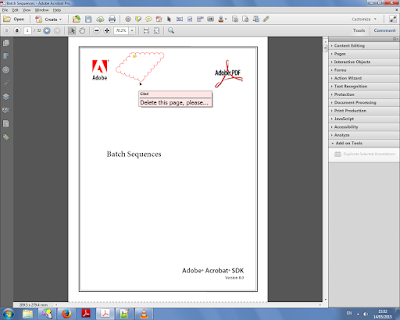
The annotation we want to duplicate (click to enlarge)

We select it with the mouse and then click the "Duplicate Selected Annotations" button under the Tools menu on the right:


We then enter the page range we want to duplicate the annotation to:


And the results can be seen on pages 2 and 3 here:


And finally up to page 10 here:


For more information about this tool you can contact me directly.

Photoshop -- Easy Navigation Between Photos

With this handy little script, which can be attached to a keyboard shortcut and run easily, you can navigate your folder of photos with ease. Jump from one photo to the next one, previous one, or the first or last photos in the same folder in a second. The photo you worked on is automatically saved, and the new photo opened, saving you time and allowing a more efficient editing process.

If you're interested in purchasing this script, contact me directly.