Acrobat -- Convert Form Fields Type


Direct purchase using PayPal ($50 only)!

Warning: Selecting fields from a list does NOT work in Acrobat DC or 2017 due to a bug in the application itself, but you can still select them using the page number / field type / name filters, and they'll be converted.

I've created a new mechanism that does allow selecting fields from a list in Acrobat DC/2017, but it is more limited than in previous versions. It allows selecting individual fields, or a range of fields from an alphabetically-sorted list and processing them all at once.

Also, Acrobat DC is not capable of converting fields whose name starts with "undefined"... Those fields have to be renamed to something else (for example, using this other tool I've created) before they can be converted.

Update: The tool now allows you to select specific fields to process from a list, so you're no longer limited convert all the fields of a certain type on certain pages (although that option is still available). You can now pick and choose the ones you want to process from a list of all the fields in the file, or just those on the current page.
The Acrobat Form Wizard can sometimes make mistakes while identifying your form fields, or sometimes you create a form and then want to change some text fields to buttons, for example. Until now you had to it manually, which can take a lot of time.
With this script you can automatically convert all form fields of a certain type to another type, in the entire document or on a specific page. It's also possible to match a certain field name.

A free demo version of this script is available here.
This version will only convert the first 10 text fields on the first page to check-boxes. Purchase the full version and be able to convert all field types on all pages!

When you run the script you get this window:


In this instance, we'll convert all Signature fields on the first page, whose name contains "Sig", to text fields.

You make your selections, press OK, and the new fields will appear in the exact location of the old ones.
Notice: when using this tool the converted fields will lose all formatting, validation and calculation settings.

For more information about this tool you can contact me directly.

Acrobat -- Sort Bookmarks


Direct purchase using PayPal ($40 only)!


With this script you can sort all of your bookmarks (ascending/descending) in various ways:
  • By Name (Update: You can now select whether this sort should be case-sensitive or not)
  • By Length
  • By Page Number
  • By Date in the start of the bookmark's name (using a format specified by the user)
If you have another criteria based on which you wish to sort the bookmarks, I can probably adjust the script for you.

The file before sorting the bookmarks in it:

(click to enlarge)

The menu items of the tool:
(click to enlarge)
The file after being sorted alphabetically:

(click to enlarge)


For more information about this tool you can contact me directly.

Reader -- Spell Check Suite


Direct purchase using PayPal ($99 per license)!


This is an adjusted version of my Acrobat Spell-Chekcer Suite, which works in the free Adobe (Acrobat) Reader applications, including Reader DC.

A free demo version of this tool that will only check the first page of file is available here.

It contains almost all of the features of the original tool, such as:
- Spell-checking using all the dictionaries installed in Reader, provided the file has Content Extraction and Commenting rights enabled.
- Spell-check an entire document or a range of pages (1,2,4-12, 15, etc.)
- Use of the Zones feature, which allows you to select which parts of a page to spell-check.
- Adding one or more (in a comma-separated list) words to a dictionary.
- Removing one, multiple, or all words from a dictionary.
- Displaying a list of the words added to/removed from the dictionary.
- Removing all spell-checker results from a file.

For more information about this tool you can contact me directly.

Acrobat -- Apply Page Rotations to Multiple Pages


Direct purchase using PayPal ($50 per license)!

With this script you can apply page rotations (90°, 180°, 270°) to one or more pages. The beauty of it is that you can enter single page numbers, or page ranges, and the script will apply the rotations to all of them in a single go.

Here's how it looks like:


If you're interested, the same concept can be applied to other things as well, for example page transitions.

For more infromation about this tool, you can contact me directly.

Reader -- Run JavaScript Code from within Reader


Direct purchase using PayPal ($60 per license)!

As developers of scripts for Acrobat and Reader know, the JavaScript console in Reader is a very handy tool. You can use it to execute your code directly from within the application, and it displays any errors that occur while you run it.
Unfortunately, in Reader the console is very limited. You can't enter or execute code in it. In fact, you can't even display it at will (Ctrl+J doesn't work like in Acrobat).
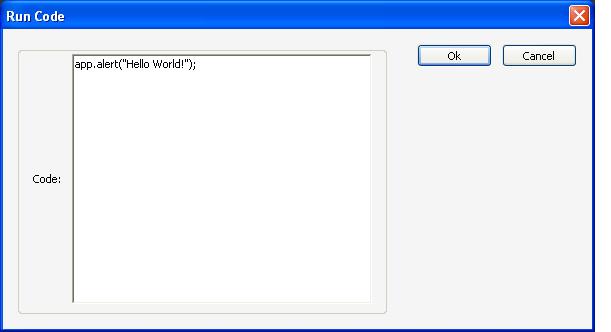
Well, I've developed a tool that enhances and extends the JavaScript Console in Reader, allowing you to run code, and it even displays any error messages, if any, in the original console.
It also comes with a menu item to display the console window.

The enhanced console (with valid code):

(the code can be copied into the console, and pasted from it)

Result of running the code:

The enhanced console (with invalid code):


Result of running the code:


For more information about this tool, you can contact me directly.

Acrobat -- Batch Edit\Remove Images

Another stand-alone tool for batch editing PDF files.
With this tool you can completely remove, or replace, certain images in your PDF files.

Let's say you have a company logo as the header of each page in every PDF, but your company decides to change its logo. So now you need to go back and re-create all the PDF files, or edit them one by one manually.
Well, this tool can do that for you, in a single go and within seconds!
Acrobat is not necessary for this tool either. It can be used on any machine.

For more infromation about this tool, or if you're interested in purchasing it, you can contact me directly.

Acrobat -- Export Values of a Combo-Box or List to a Text File


Direct purchase using PayPal ($20 only per license)!

The complementary script for Acrobat -- Import Text File to a Combo-Box or List Field. This one does exactly the opposite: it allows you to select a combo/list-box form field and export its values (and export values) to a text file.

For more information about this tool, you can always contact me directly.

Acrobat -- Print as Booklet


Direct purchase using PayPal ($50 per license)!

With this script you can take a PDF file and print it out as a booklet, either with a cover page, or without.
Another version of this script will rearrange the pages of the PDF into booklet form, again with or without a cover page.

A Booklet without a cover will be:
1, last page, 2, one-before-last page, 3, etc...

A Booklet with a cover will be:
1, 2, last page, 3, one-before-last page, 4, etc...

For more information about this script, you can contact me directly.

Acrobat -- Auto Generate Form Fields


Direct purchase using PayPal ($50 per license)!

Sometime you need to create many form fields, but doing so using the built-in tools of Acrobat can be a pain. You need to create each one by hand, or copy-paste and then rename them, and then align them, make sure they have similar names and properties, etc. This script is meant to offer a solution to this annoying problem.

You just need to create the first two fields, like so:


Then you run the script, enter the "base name" of the fields you've created ("PN" in this case):


Followed by the number of fields you want to create:


And the script will generate those fields for you, with proper names, alignment, properties, etc.


The script will automatically detect whether the fields should be placed in the same column or the same row as the ones you've created. A real time saver!

For more information about this tool you can contact me directly.

Acrobat -- "Live" Characters and Words Counter


Direct purchase using PayPal ($30 per license)!


If you have a text box that the user can input text to and you want to display, or just control, how many characters or words the user have entered, this is the script for you. It works live, as the user is typing, and not just when they are done.

When you run the script you're prompted to select the fields, as well as what to count:

The script settings dialog
 
And the result:


For more information about this script, you can contact me directly.

Acrobat/Reader -- Quick Print Current Page


NEW: Direct purchase using PayPal ($15 only per license)!

This script will create a new button in Acrobat's toolbar that will allow you to print the current page of a document with a single click.


If you have any questions regarding this tool, you can contact me directly.

Acrobat -- Track and Monitor How Users View Your PDF

This script is a special development. It allows you to monitor how users are viewing and using your PDF files. Whenever a file is opened, a page is viewed, or a file is closed, the script will write this data to a local or networked database. This can provide a lot of interesting information about the way your users, or clients, are viewing your PDF files.
The monitoring is done in a completely silent way, so the user is not interrupted while working.

A future version of this script will also include saving this information over the internet.

Here's an example of what the data in the DB might look like:


If you're interested in purchasing this script, contact me directly.

Acrobat -- Quick Links to Frequently Used Files or Operations

If there are files that you need to open frequently in Acrobat, or operations that you need to run frequently (like opening the Batch Process window, or flattening a file), I can create for you custom-made menu items or toolbar icons that will do so with a single click! It's up to you to decide which icons to use and where to place the new menu items...


If you're interested in purchasing this script, contact me directly.

Acrobat/Reader -- Export Form Fields' Names, Properties


Direct purchase using PayPal ($20 only per license)!
 
If you want to keep track of the different form fields in your PDF, this is the tool for you. It will create a text report with all of the fields names, types, and other properties you might be interested in. If you're interested in purchasing this script, contact me directly

Acrobat -- Adjust Size of Multi-line Text Fields before Printing

Acrobat form fields has an option to create a multi-line text fields, which is very handy when you need to input a lot of data, but what about when you want to print the file? This script will automatically scan a PDF file and adjust the size of the text fields so that all text entered into them is visible. It uses a special algorithm developed by me which takes into account the font size, as well as other properties.

If you're interested in purchasing this script, contact me directly.